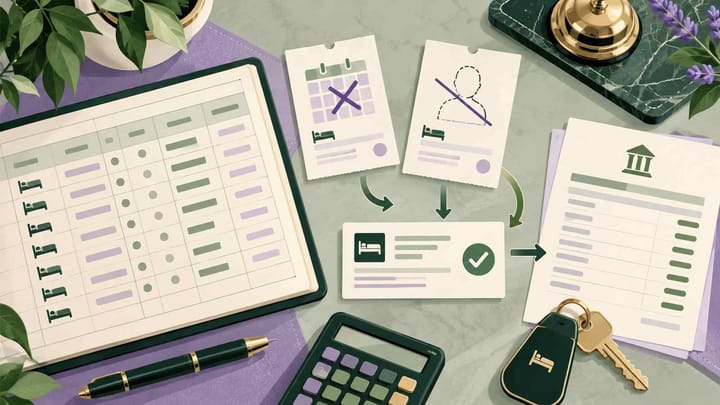
1. Reconcile the final reservation outcome before comparing expected payment with cash received.
2. A cancelled stay can retain a fee; a reported no-show can have a waiver. Record both the status and the financial decision.
3. Keep guest refunds, hotel collections, Expedia adjustments, and PMS corrections as separate events with matching references.
Expedia Collect reconciliation becomes harder when the guest never arrives, cancels late, or receives an approved refund. The original reservation total may remain in the hotel's records while the amount payable by Expedia has changed.
For Expedia Collect, Expedia collects the covered booking payment from the traveler and pays the property under its agreed arrangement. This workflow focuses on changed or unconsumed stays. Start with what ultimately happened to the reservation, then establish the hotel's entitlement and trace the money.
Build the Final Expedia Collect Record
Open the current reservation in Partner Central and the Property Management System (PMS). Match the property, Expedia reservation ID, hotel reference, dates, room, and currency. Keep a record of the original booking alongside its latest confirmed outcome.
Separate four figures: the original reservation value, the final fee or stay value, the amount Expedia instructs the hotel to collect or receive, and money actually collected. Those figures answer different questions. A cancellation notice changes the stay status; it does not by itself prove a refund or payment occurred.
Check the remittance instructions for this booking. Updated Expedia Collect can show the full traveler-facing reservation amount even where the property's settlement differs. Do not treat an imported PMS total as a universal net payout or deduct commission a second time merely because the original record looks gross.
For a changed booking, create a short explanation of the difference. "Three nights changed to one, two nights waived, revised payment awaiting confirmation" is more useful than "Expedia mismatch." Identify who approved the change and whether Expedia has confirmed the same financial outcome.
Reconcile a No-Show or Cancellation Against Its Fee Decision
The Guest Did Not Arrive
Confirm the absence with reception before recording a no-show. Check late-arrival messages, self-check-in evidence, and approved date changes. For several rooms, identify the rooms that were actually unused.
Report the correct outcome through the reservation's available Partner Central process and retain confirmation. Review the options and deadline displayed for that reservation; do not apply another channel's reporting window. If an action is unavailable, request help promptly with the booking reference.
Next establish whether a fee is retained, reduced, or waived under the booked policy and any approved exception. Do not automatically cancel the entire financial balance when removing the guest from the arrival list. Equally, do not keep the whole stay as collectible room revenue just because that was the original total.
The Guest Cancelled
Check the cancellation time against the policy attached when the guest booked. Confirm whether a penalty remains and whether an exception was approved. Preserve evidence where the confirmed policy and displayed final amount disagree.
A guest's request for free cancellation is not yet an approved waiver. A manager's approval also needs to be reflected in the platform outcome before finance relies on it. Keep the operational decision and the submission confirmation together.
If reception updates the PMS but finance continues using the original stay value, the hotel's expected collection will be wrong. Smart Order keeps the channel reservation in the hotel front desk workspace, where staff can review the current booking and retain the confirmed fee decision. Finance can then investigate the revised balance against the same record.
Give Finance the Confirmed Reservation Outcome
Keep booking changes and follow-up notes together so no-show and cancellation balances are reviewed against the right stay record.
Trace the Revised Payment and Any Refund
After the outcome is confirmed, reopen the payment or remittance details. Establish the latest amount the property may collect, any amount already received, and whether Expedia expects a return or adjustment. Do not charge an old virtual-card amount simply because it remains saved in the PMS.
If nothing was collected and the final hotel entitlement is zero, check that the hotel no longer carries an outstanding Expedia balance. If a fee remains, keep that fee as a separate confirmed amount and follow the current payment instructions. An unused room does not necessarily mean a zero financial result.
Money Was Already Collected Before the Change
Match the successful transaction to the booking, then compare it with the revised entitlement. Identify the amount to be returned or offset through the approved process. Do not delete the original payment to make the screen look correct; finance needs to see both collection and correction.
For example, the hotel collected EUR 300 before an approved cancellation changed its entitlement to EUR 90. The EUR 210 difference requires a documented refund or adjustment outcome. It should not disappear through a change to the original payment reference.
A Guest Refund Has Been Approved
Identify who collected the covered guest payment and who must execute the refund. For Expedia-collected room payments, process the request through Expedia's applicable reservation workflow. Do not make a separate refund to the guest as well as returning funds through the Expedia arrangement.
Keep onsite charges separate. If the hotel collected parking directly, that refund belongs to the hotel-side transaction. The room refund and parking refund may therefore have different references and completion dates.
A Future Adjustment Is Expected
Record the case reference, amount, currency, and expected method of correction. When the adjustment appears, match it to the original exception before posting it. An adjustment on a later statement should not become a second expense or a new unexplained deduction.
Where the hotel uses integrated payment records, retain the related collection and refund results. For payments processed outside the PMS, keep external transaction references with the reconciliation evidence. Approval and completion should remain distinguishable.
Update Hotel Records Without Double Counting
Reconcile each exception in a consistent order. The aim is a traceable final position, not identical totals on every screen.
- Confirm the final stay status and the fee or waiver accepted for that booking.
- Verify the latest amount payable to the hotel and any separately payable onsite charges.
- Match successful hotel collections using transaction or payout references.
- Record approved refunds, returns, and Expedia adjustments with their own completion evidence.
- Correct the PMS balance and revenue classification through the hotel's authorized accounting process.
- Match bank settlement and retain any unresolved item with an owner and review date.
Use the hotel's accounting policy to distinguish stayed nights, cancellation or no-show fees, taxes, commission, processor costs, and cash. A fee retained for an unused room should not inflate occupied room nights. The booking can be financially settled without being recorded as an actual stay.
Likewise, a room returned to inventory and a refunded payment are separate outcomes. Review remaining dates and room counts after the reservation update. A correct finance record does not establish that the right nights are back on sale.
Use hotel reporting and analysis to compare hotel-side reservation values, fees, and collections. Review settlement differences separately from the amount the guest paid. Keep the original booking and adjustment history available rather than replacing everything with one unexplained final total.
Close Exceptions With Evidence, Not Just Matching Totals
Expedia Shows a Cancellation, but the PMS Still Shows a Stay
Check the reservation ID and latest update before correcting the hotel record. Preserve any fee that remains due. Remove consumed-night assumptions only through the appropriate operating and accounting process.
The PMS Says Refunded, but No Refund Is Confirmed
Find the actual refund or adjustment reference. A reservation note or manager approval is not proof that money moved. Assign the outstanding action and avoid sending another refund until the first request's status is known.
The Expected Payment Still Uses the Original Total
Compare the latest fee decision with the current remittance instruction. Establish whether the platform update is pending, the hotel record is stale, or the amount is genuinely disputed. Do not hide the gap by changing revenue solely to match a bank deposit.
The Bank Deposit Is Lower Than the Card Collection
Check processor fees, batch composition, and settlement timing. A EUR 90 successful collection and an EUR 88.20 net bank receipt can be explained by a separately verified EUR 1.80 fee. That is different from Expedia reducing the approved entitlement.
Before closing, make the record readable to someone who did not handle the case. It should explain the final status, retained or waived fee, hotel collection, refund or adjustment, and bank position. If one stage remains unresolved, record the next action rather than marking the whole reservation complete.
Frequently Asked Questions
Does an Expedia Collect cancellation always mean no hotel payment?
No. A cancellation may retain a fee or be fully waived. Check the booked policy, approved exception, and current payment instructions.
Should the hotel refund the guest's Expedia room payment directly?
Use the applicable Expedia refund process for the room payment it collected. Handle hotel-collected onsite items separately and avoid duplicate refunds.
Is a no-show fee the same as room revenue from an occupied stay?
Keep the fee classification and occupied room nights distinct under the hotel's accounting policy. A retained fee does not mean the guest stayed.
Why does the PMS total differ from the amount payable by Expedia?
Check the settlement arrangement, approved changes, deductions, and separate charges. Updated Expedia Collect can show the full traveler amount while settlement follows its remittance instructions.
What evidence closes a cancelled booking for finance?
The confirmed outcome, fee decision, revised payment instructions, verified collections and corrections, and matched or assigned bank settlement. A cancelled status alone is insufficient.
