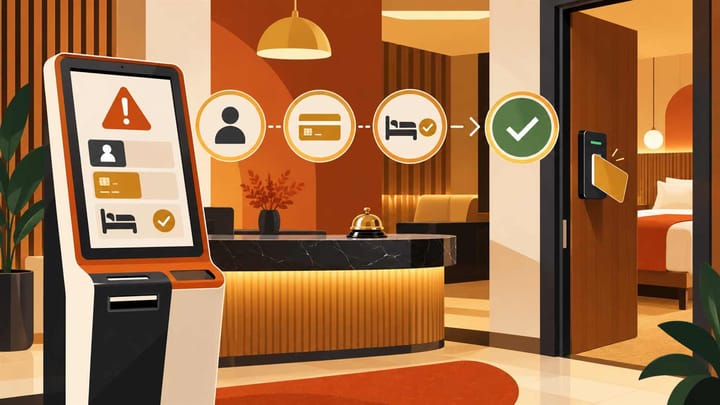
1. Find the existing reservation and the exact step that failed before asking the guest to start again.
2. Check identity, payment, and room readiness separately; completion of one does not approve the others.
3. Use a named staff handoff when self check-in cannot continue, then verify the final reservation and access status.
The guest has completed a form, attempted a payment, and arrived at the door. The screen still says check-in is incomplete. Your priority is to get that guest safely settled without charging twice or releasing a room that is not ready.
Hotel front desk software gives staff the reservation, payment position, and room assignment to check. Use those records to find the failed step. Repeatedly sending the same link rarely fixes a wrong guest name, an unclear payment, or an uninspected room.
Find the Booking in Your Hotel Front Desk Software
Self check-in failure means the guest cannot complete one or more arrival steps without help. It does not prove that the reservation failed or that payment was declined. A completed registration form also does not prove that the guest is checked in or has valid room access.
Ask for the booking reference and the step or message on screen. Open the existing reservation in your hotel front desk software and check the property, arrival date, guest name, room assignment, and current status. Look for a recent date change, a different booker, or an arrival after midnight.
If the booking exists, keep working from it. Do not create a walk-in replacement simply because the guest's link cannot find it. If two employees are helping, name one owner so they do not separately charge the guest or issue different room instructions.
For a guest standing outside, offer a clear next step and an honest update. For example: "I have found your reservation. I am checking the payment and room release before arranging access." Do not ask the guest to send full card details or an identity-document image through ordinary chat.
Resolve Identity and Registration Problems First
The Guest Cannot Find the Reservation
Check the confirmation reference, the correct hotel, and the stay dates before altering anything. A reservation made by a spouse, assistant, or agent may show the booker's name rather than the arriving person's name. Confirm the actual guest through the hotel's approved verification procedure.
An old link may relate to a stay before it was modified. Once the reservation is verified, use the supported way to resend the current invitation. Do not change the booking name to match an unverified message merely to make the search work.
The Identity Scan or Form Will Not Complete
Check for a missing required field, unreadable image, unsupported document, expired invitation, or a mismatch between the arriving guest and the reservation. Where the problem is image quality, explain how to retry through the approved check-in screen. Avoid collecting extra document copies in personal messages.
If the automated step still cannot complete, transfer the guest to trained staff for the approved manual check. Apply the property's identity and registration requirements; these vary by location. A failed scanner is not permission to bypass them or issue access to someone whose identity remains unresolved.
When staff cannot see which booking the guest is trying to complete, every reply becomes another round of questions. Smart Order links reservation management with guest communication, so the desk can locate the stay and continue the conversation with its booking context. That helps staff give a specific next step instead of asking the guest to restart everything.
Give Staff the Context to Rescue a Stalled Arrival
Bring the reservation and guest conversation into the same operating workflow so your team can identify the blocked step and arrange a clear staff handoff.
Check What Happened to the Payment
First establish what the hotel is entitled to collect. An OTA-prepaid stay, a hotel-collect booking, an outstanding local charge, and an incidental deposit can require different treatment. "Payment required" on a check-in screen does not by itself establish a new room charge.
The Guest Says They Paid but the Screen Still Blocks Them
Compare the amount, currency, time, and transaction reference in the approved payment record. Check whether the attempt completed, remains pending, was declined, or only placed a temporary hold. A banking-app screenshot can help locate an attempt but should not replace the hotel's payment confirmation.
If the result remains unclear, stop repeated collection attempts and ask the payment owner to verify it. Do not mark the reservation paid without evidence. Equally, do not ask for another full payment solely because the guest-facing screen has not updated.
A Confirmed Decline Prevents Completion
Explain the outstanding amount and offer an approved alternative, such as the hotel's secure payment route or an assisted terminal payment. Have the guest complete any bank approval privately. Never ask them to send a security code, card photo, or bank login to reception.
With integrated hotel payments, the desk can compare recorded transactions with the reservation before collecting again. If a temporary payment exception is allowed, the duty manager should record the amount, reason, collection owner, and deadline. That exception does not remove the separate identity and room checks.
Confirm the Room Is Ready Before Releasing Access
Check the assigned physical room, not only the room type. A booking can be confirmed and fully paid while its room remains occupied, dirty, awaiting inspection, or held for maintenance. None of those conditions is corrected by sending another check-in link.
Ask the authorized floor employee to verify the room and complete the normal readiness process. Check early-arrival expectations and late checkouts. If the room is not ready, give a realistic update and consider an approved alternative that meets the guest's booked requirements.
When the reservation says checked in but the door will not open, treat it as an access problem rather than starting a new booking. Confirm the correct door, room assignment, access validity period, and supported key or lock procedure. Use trained staff for a physical key or access reset where needed.
Do not send a general master code or another guest's instructions as a shortcut. If a room change was necessary, check that obsolete access is removed and the guest receives only the current instructions. Digital keys and lock behavior depend on the installed access setup, not just the PMS reservation status.
Finish With One Controlled Staff Handoff
Use assisted check-in as the fallback when the automated route cannot safely finish. At a small property, define an on-call employee and an approved arrival contingency in advance. Do not advertise unattended late-night arrival without a workable way to help a locked-out guest.
- Tell the guest who is taking over and how to reach that person through the approved contact route.
- Open the existing booking and record which step failed, what was already completed, and which checks remain.
- Complete the approved identity check and confirm the payment position or documented manager exception.
- Verify the room's readiness and assignment, then complete check-in once through the supported staff procedure.
- Arrange valid room access and confirm the guest can use it without exposing access details to others.
- Reopen the reservation to verify the final status, room, and balance. Close the case only after recording any remaining follow-up and its owner.
Keep the conversation in your unified guest messaging inbox where supported. Record the outcome, not a copy of the guest's identity document or payment credentials. The next shift needs to know whether the guest entered the room and whether money or another task remains outstanding.
Review repeated failures by the step that stopped the guest. Several unreadable document scans require a different response from several rooms waiting for inspection. Test the corrected journey with an approved test reservation and payment test method before expecting the next arrival to prove it works.
Self Check-In Failure Questions
Does a completed online form mean the guest is checked in?
Not necessarily. Registration, payment, room release, check-in status, and access may be separate stages. Confirm the saved reservation and room access rather than relying only on the guest's form-complete message.
Should the guest pay again after a payment screen freezes?
Not until staff establish the result of the first attempt. Compare the payment record, amount, currency, and reference before deciding whether another collection is necessary.
Can reception skip an identity check when the scanner fails?
Use the approved assisted verification route and follow the property's applicable registration requirements. A scanner failure should change the method of checking, not remove the check.
What if a guest arrives before their room is ready?
Keep access blocked until the room is properly released. Explain the wait, coordinate with housekeeping, and consider a suitable approved alternative without marking an unready room as ready.
When should a self check-in problem be considered resolved?
When the right guest is checked into the right ready room, payment is confirmed or covered by an authorized exception, access works, and all remaining tasks have an owner. A resent link alone is not resolution.
